Know when your AI coding assistant needs you
AgentWatch watches Claude Code, Cursor, Codex and other AI coding assistants while they work. It tells you when one is going in circles, keeps failing, is burning through money, or is doing something risky with your passwords, keys or data.
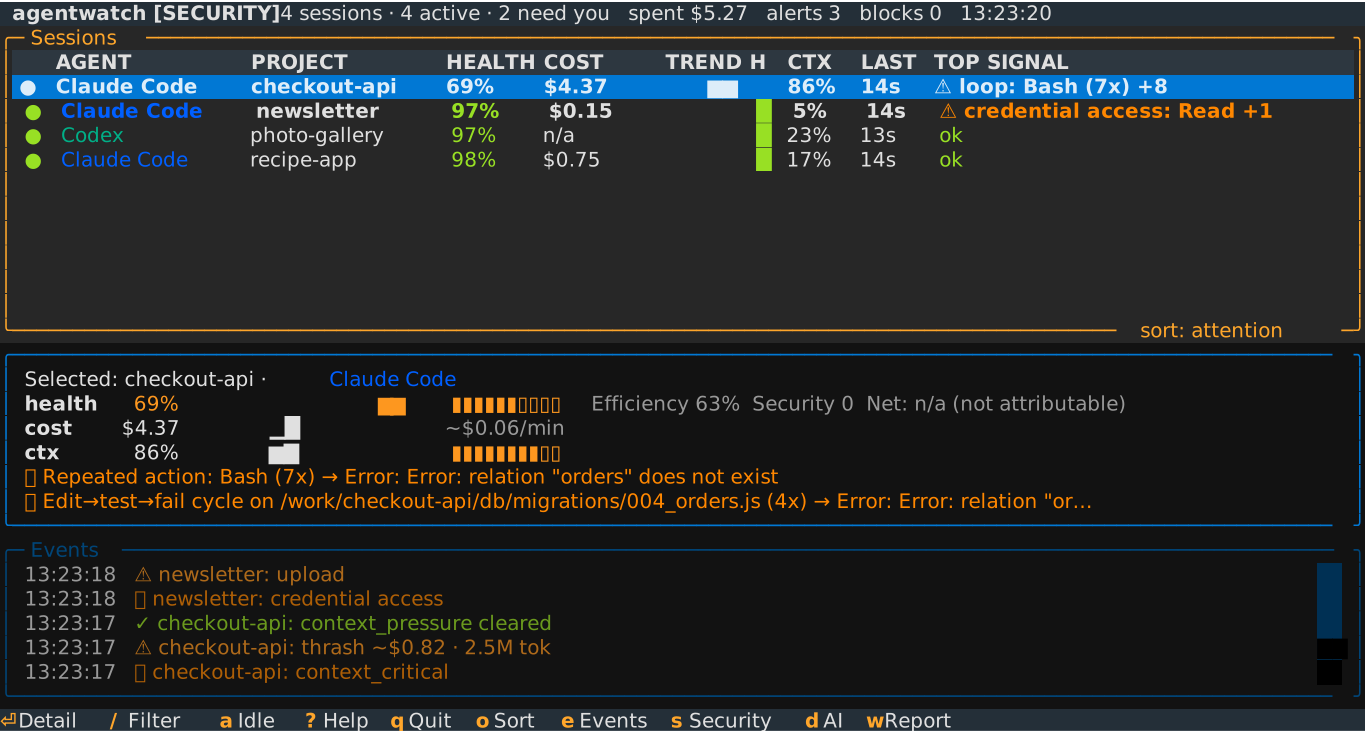
agentwatch watch-all --security) with four
made-up sessions: one stuck re-running a failing command, one that read a password
file and uploaded it, and two working normally. Security 0 means no security findings
for that session.
Open full sizeWhat it watches for
Wasted time and money
- Going in circles. It runs the same command, gets the same error, and runs it again.
- Failing over and over. Step after step fails, and nothing works in between.
- Stuck, no progress. It keeps reading and searching files but never changes anything.
- Forgetting earlier work. Its memory (the context window: how much of the conversation it can hold at once) fills up, and it goes back to files it already read.
- Burning money. AI services charge by the token, a few characters of text. AgentWatch estimates what each session has cost so far, and how much of that went on steps that led nowhere.
Security
- Leaked passwords and keys. An API key (a password for an online service) shows up in a command the assistant ran or in what it wrote.
- Prompt injection. Hidden instructions in a file or web page try to take over the assistant, such as "ignore your previous instructions".
- Data sent somewhere unexpected. It opens your
.envfile, where passwords are often kept, and then sends data to a server. - Dangerous commands. It deletes files in bulk, or gives itself administrator
rights with
sudo. - Unknown add-ons. A new skill (an add-on that gives the assistant new abilities) is installed, or starts connecting to the internet.
How it works
-
Install it
Open a terminal, the app where you type commands, and run one command:
pipx install agentwatch-monitor. You need Python 3.11 or newer. Get started has the steps for Mac, Windows and Linux. -
Run it next to your assistant
In a second terminal window, run
agentwatch watch-all. It finds the assistants running on your computer by itself and follows each session as it works. -
Read the score
Every session gets a health score from 0 to 100 and a list of what is wrong, in plain words. Add
--security, or press s, to turn on the security checks. For a one-word verdict (secure / at risk / compromised), runagentwatch security-scan.
The health score, from 0 to 100
- Stuck 0–39
- Spinning 40–59
- Struggling 60–79
- Productive 80–100
In the screenshot above, checkout-api scores 69: struggling.
These are AgentWatch's own words for each range; if you prefer healthy, degraded,
warning and critical, add --theme classic.
agentwatch security-scan gives a separate
security verdict: Secure when nothing is
found (100),
At risk from 50 to 99, and
Compromised below 50. One critical finding,
such as a password file being read and then sent over the network, means
compromised.
It stays on your computer
Your assistant already keeps a log of everything it does. AgentWatch reads that log on your own computer, and that is all it needs.
- No server, no account. There is no AgentWatch server and nothing to sign up for.
- Your code and conversations are never uploaded. If you set up an alert webhook, each alert sends a short warning message (which can name a file or command) to the address you chose. Otherwise it only looks up server names (details).
- No AI in the checks. They are plain rules, so they cost nothing to run and give the same answer every time.
- Free, and the code is public. It's open source under the MIT license. Anyone can read the code on GitHub.
Works with Claude Code, Cursor, Codex, the ChatGPT desktop app, GitHub Copilot, Aider, Gemini CLI, Cline, OpenCode and more. See which are fully tested.
AgentWatch is built by LoomLabs.